Auto-Send Rules
What Are Auto-Send Rules?
Auto-send rules automatically generate email drafts when new leads are captured. Based on the lead's temperature and configurable timing, Conference Hero creates personalized follow-up emails ready for your review.
Setting Up Rules
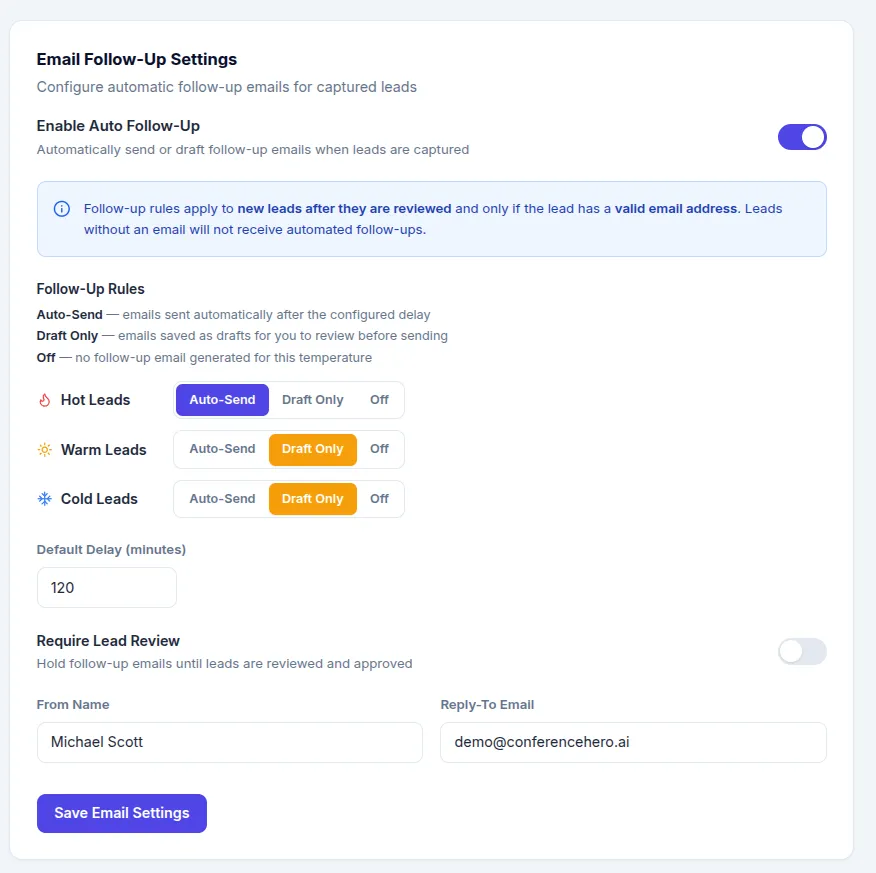
Go to Settings → Email Follow-Up
Enable Auto Follow-Up
Choose between Add-Send, Draft Only or Off for either Hot, Warm or Cold leads (the rule works for all future leads that are being reviewed and categorized accordingly.
Configure the default Delay, Name and reply-to email (change the standard Conference Hero email address, because its a no-reply email).
Save the Settings
Auto-generated drafts appear in the Emails section for review before sending.
Tagsemailautomation