Task Templates
What Are Task Templates?
Task templates are reusable checklists that help you consistently prepare for conferences. Instead of creating tasks from scratch each time, apply a template to instantly populate your task board with a proven checklist.
Using Built-In Templates
Conference Hero includes several built-in templates to get you started:
Full Conference Playbook — End-to-end task list from initial planning through post-show follow-up. Ideal for teams running the full conference lifecycle.
Pre-Show Preparation — Everything you need before the conference doors open; logistics, materials, goals, and team alignment.
Speaking Engagement — For team members presenting a talk or panel. Covers talk prep, slide design, networking, and post-talk follow-up.
Creating Custom Templates
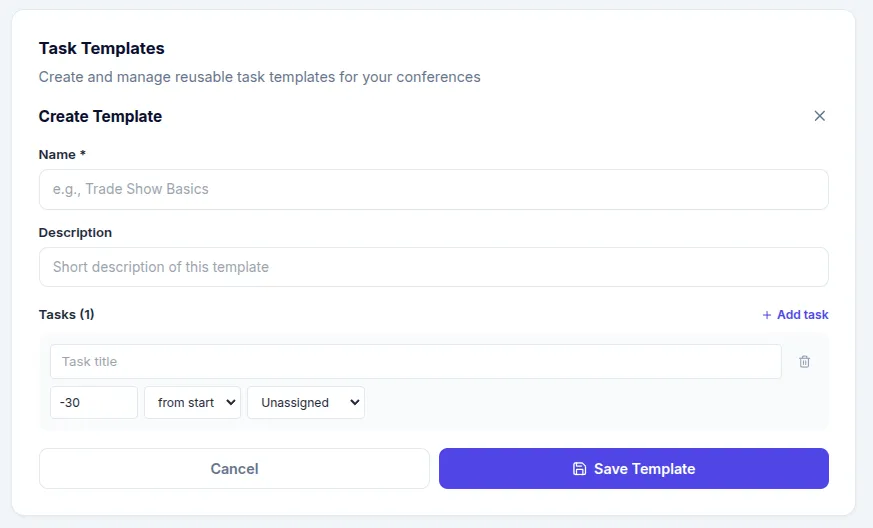
Go to Settings → Workspace → Task Templates
Click New Template
Add a name and description
Add items with title, day offset (relative to conference start/end), and assignee slot
Save your template
Day Offsets
Each template item has a day offset — a number relative to the conference start or end date. For example:
-14 days from START— Two weeks before the conference0 days from START— The first day of the conference+3 days from END— Three days after the conference ends
When you apply a template, Conference Hero automatically calculates the actual due dates based on your conference dates.
Related: Task Management & Kanban Board · Assigning & Tracking Tasks