Task Management & Kanban Board
Task Management Overview
Conference Hero's task management system helps your team stay organized throughout the conference lifecycle — from pre-show preparation to post-show follow-up.
The Kanban Board
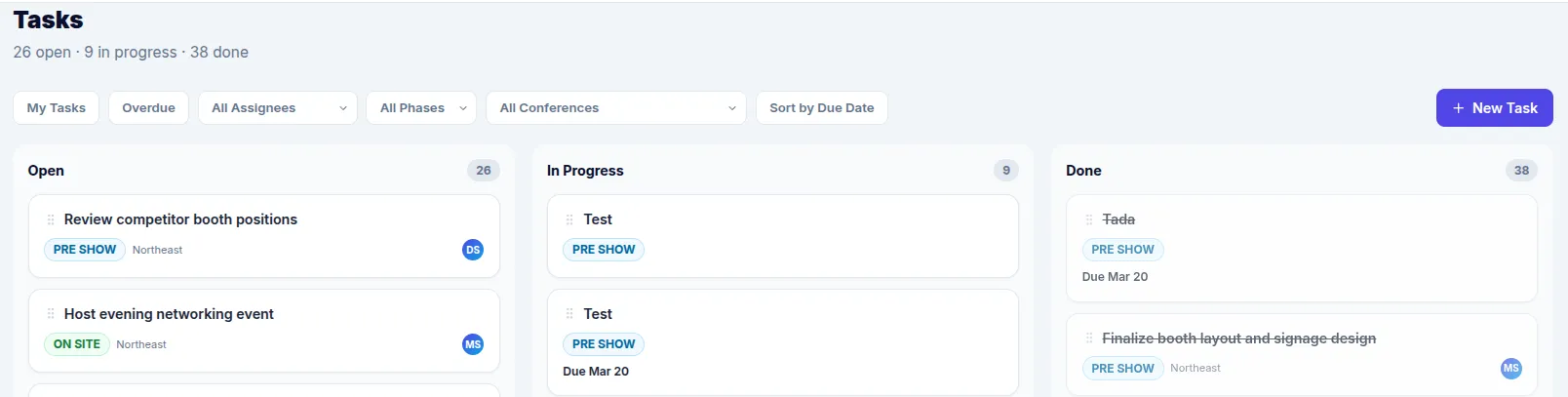
Tasks are displayed on a Kanban board with three columns:
Open — New tasks that haven't been started
In Progress — Tasks currently being worked on
Done — Completed tasks
Drag and drop tasks between columns to update their status. Each task card shows the title, assignee, due date, and phase tag.
Creating Tasks
Click Add Task to create a new task. Fill in:
Title — What needs to be done
Phase — Pre-Show, On-Site, or Post-Show
Assignee — Who's responsible
Due Date — When it needs to be completed
Conference — Which event this task belongs to
Task Phases
Tasks are organized by conference phase:
Pre-Show — Preparation tasks (booth setup, materials, logistics)
On-Site — Tasks for during the event (lead capture, demos, meetings)
Post-Show — Follow-up tasks (lead review, reporting, thank-you emails)
Save time by using Task Templates to pre-populate tasks. For team assignment details, see Assigning & Tracking Tasks.