Conference Follow-Up Email Generator (Free Templates)
The hardest part of post-show outreach is not deciding to send mail. It is writing the first message while the conversation is still fresh and your inbox is a mess. A conference follow-up email generator gives you solid first drafts in minutes so you can personalize the parts that matter and hit a real SLA instead of staring at a blank compose window.
This walkthrough covers Conference Hero's free conference email generator: when to use each scenario, how to feed CRM context, and how to keep copy human. For the broader follow-up process (timing, channels, sequencing), see how to follow up with conference leads effectively. This post stays on the tool and the craft of the email itself.
Why first-touch copy dies after the show
By Thursday of a busy week on the floor, your team has dozens of half-remembered conversations. Notes live in badge apps, Slack, and napkin photos. Without a template system, SDRs either send generic "great meeting you" notes that get ignored, or they delay until the lead feels cold.
A generator will not replace judgment. It removes the empty-page tax so reps spend energy on the two or three details that prove they were listening.
What the free Conference Hero email generator does
Open the tool, pick a scenario, add a few inputs about the prospect and your offer, and you get draft copy you can paste into your sequencer or CRM. It is built for post-conference outreach, not generic cold email. That means the defaults lean on show context, next steps, and a clear ask instead of long product pitches.
You will find it among the other free utilities on the Conference Hero tools page. No campaign setup required to try a draft.
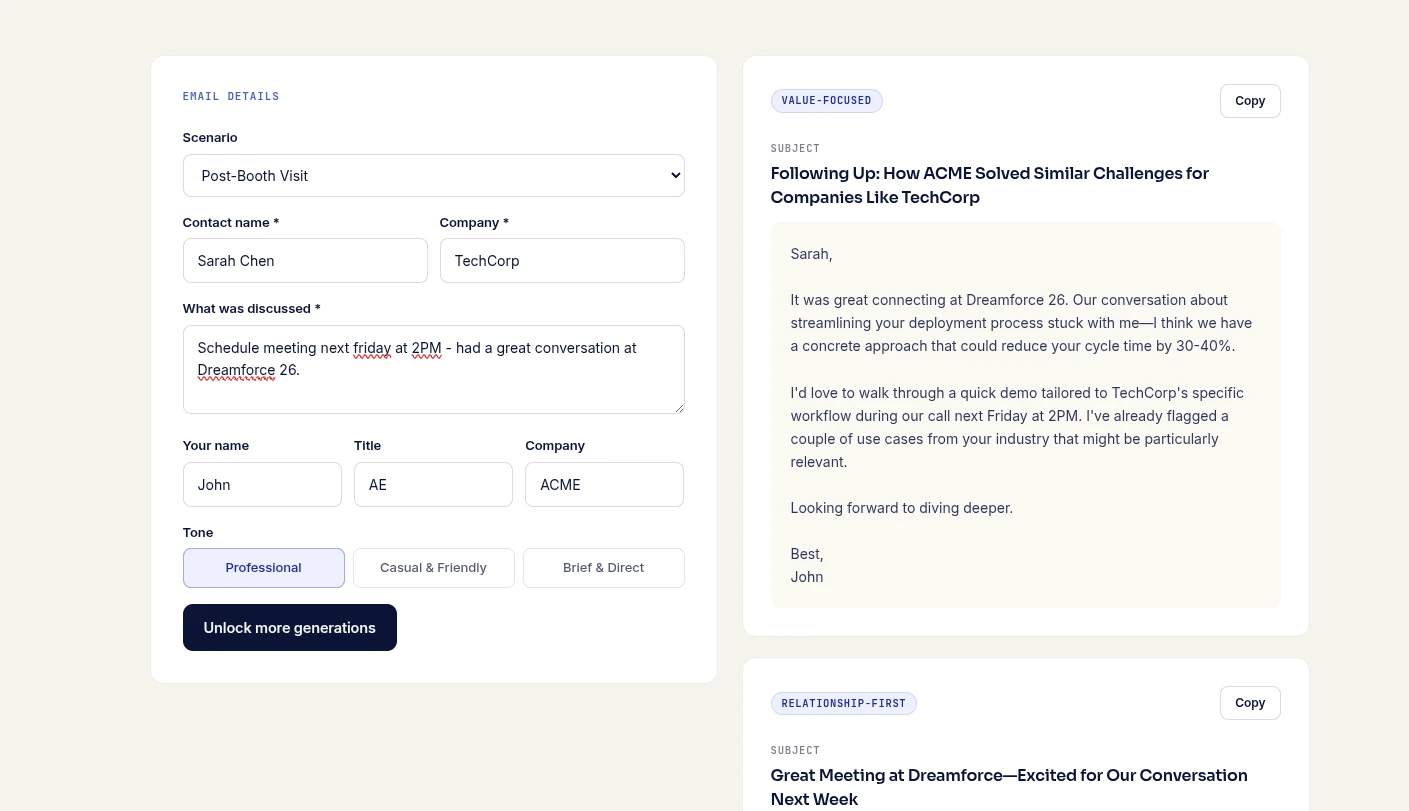
Scenario picks that match real booth conversations
Start with the conversation you actually had, not the persona slide in your deck.
Met at the booth, clear pain: Reference the problem they named, restated in their words, then propose one concrete next step (15-minute call, sample, or intro to a specialist).
Met at a session or party, softer interest: Lead with the shared moment, keep the ask light, and offer a resource instead of a demo hammer.
Warm intro from a partner or customer: Credit the introducer early, then bridge to why a short call still makes sense.
No-show to a booked meeting: Short, gracious, and easy to reschedule. Guilt rarely converts.
Executive sweep / brief hallway chat: Fewer sentences, higher signal. Offer a one-pager or AE intro rather than a long nurture.
If booth staff used structured questions, pair this with your qualification notes. The booth qualification scripts for conference leads post is a useful companion so the generator has better inputs.
How to feed CRM context without overstuffing the prompt
Good inputs beat clever prompts. Before you generate, pull:
Full name, title, company (spelled correctly).
Event name and date, plus where you met (booth, session title, dinner).
One specific detail from the chat (stack, initiative, objection, timeline).
The single next step you want (book a call, send pricing, intro to SE).
Anything the CRM already knows that should not be re-asked (current customer, open opp, competitor mentioned).
Skip dumping the entire account history into the tool. Three sharp facts produce cleaner drafts than a paragraph of noise. After generation, skim for hallucinated details. If the draft invents a product interest you never discussed, cut it.
Personalization that actually moves reply rates
Personalize the first two lines and the ask. Leave the middle structural:
Line 1: Where you met + one concrete callback ("You mentioned consolidating two point tools before Q4").
Line 2: Why you are writing now (promise of a useful follow-up, not "circling back").
Body: One outcome, one proof point max, no feature tour.
Ask: A specific time window or a binary choice, not "let me know your thoughts."
Conference follow-up emails fail when they sound like a newsletter. Keep them short enough to read on a phone between flights home.
SLA for first touch after the show
Set a team rule before you fly out. A practical default:
Hot / high-intent: Same day or next business morning.
Solid ICP, clear next step: Within 48 hours of the show ending.
Soft interest / nurture: Within five business days, with a lighter resource-led note.
The generator helps you hit those windows because drafting is no longer the bottleneck. Ownership still matters: assign each badge scan an owner before the plane lands, or the SLA is theater.
Edit checklist before you hit send
Remove any claim you cannot back up from the conversation.
Confirm names, company spelling, and event name.
Cut filler openers ("I hope this email finds you well").
Make sure the CTA matches what you offered in person.
Add the CRM task or sequence enrollment so the second touch is already scheduled.
Templates are a starting point. Your reputation after the show depends on the edits.
Sample first-touch structure you can reuse
Whether you generate the draft or write it yourself, a reliable skeleton looks like this:
Subject: Quick note from [Event] - [specific topic they raised]
Body:
[Name], good to meet you at [Event] near [booth / session]. You mentioned [specific detail].
We help teams like [Company type] [one outcome in plain language]. If it is useful, I can share [resource or 15-min walkthrough] this week.
Would [day] or [day] work for a short call, or should I send the one-pager first?
Notice the subject line carries a real callback. "Following up from the conference" is easy to ignore in a crowded inbox. A detail from the floor earns the open.
Common mistakes the generator will not fix for you
Sending the same draft to every badge scan with only the first name swapped.
Promising a demo when the prospect asked for a case study.
Waiting for "perfect" notes instead of sending a short, honest message with what you remember.
CC'ing half the booth team on a first touch and making the reply awkward.
Treat the output as a junior SDR draft. You are still the editor of record.
How this differs from process guides and vendor roundups
If you need the full multi-touch system (calls, LinkedIn, timing across two weeks), use the follow-up process guide linked above. If you are comparing paid sequencers and inbox tools, that is a different buying decision. This page is intentionally narrow: use the free generator, improve the first email, ship it on time.
Try it on your next show
1. After each meaningful booth conversation, capture three facts in your lead tool.
2. Same evening or next morning, run those facts through the conference follow-up email generator.
3. Personalize the opening and the ask, then send under your name.
4. Log the outcome so the next touch is planned, not improvised.
Fast, specific first touches beat perfect prose that lands a week late. Use the free templates to clear the blank page, then spend your judgment where buyers actually notice it.