Lead Management and Scoring
Capture Leads at Every Touchpoint
Conference Hero gives your team multiple ways to capture leads on the event floor. Scan QR codes from attendee badges, use the built-in badge scanner for physical readers, or add contacts manually when you meet someone at a session or networking event. You can also embed lead capture forms on your event landing pages to collect registrations before the conference even starts.
Every lead enters a single pipeline regardless of how it was captured. No more juggling spreadsheets or syncing multiple tools after the show. Your team sees every contact in one place, with the source and capture timestamp attached automatically.
AI-Powered Lead Scoring
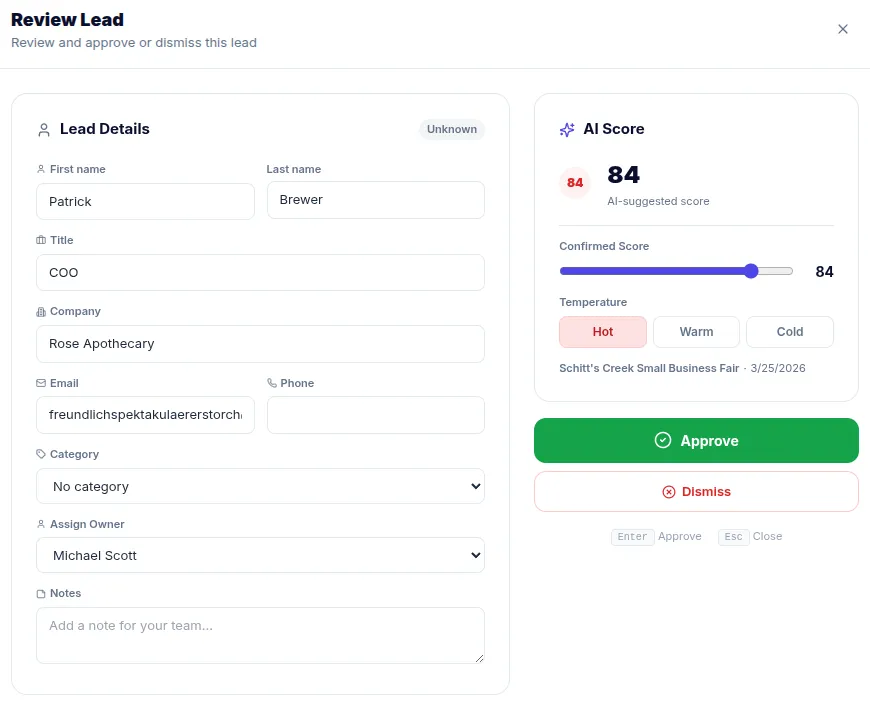
Not every lead deserves the same follow-up effort. Conference Hero's AI scoring engine evaluates each contact based on job title, company size, engagement signals, and conversation notes. Leads are classified as HOT, WARM, or COLD so your sales team knows exactly where to focus their energy in the critical 48 hours after an event.
The scoring runs automatically as leads come in. Your reps don't need to manually tag or rate contacts during the chaos of a live conference. They just capture the lead and let the system handle prioritization.
Custom Scoring Rules
Every team has different criteria for what makes a great lead. Conference Hero lets you build custom scoring rules that weight the fields and signals that matter most to your business. If VP-level titles at companies with 500+ employees are your sweet spot, you can configure rules that bump those contacts to the top of the list automatically.
Rules are configurable per workspace and can vary by conference. A cybersecurity event might weight CISO titles heavily, while a marketing summit might prioritize CMOs and Directors of Demand Gen.
Review Queue and Export
After the event wraps, your team can work through the lead review queue to quickly qualify or dismiss contacts. The queue surfaces leads in priority order so the highest-potential prospects get reviewed first. Once reviewed, export your qualified leads as a CSV file or push them directly to HubSpot or Salesforce for immediate follow-up.
The review process keeps your CRM clean. Instead of dumping every badge scan into your pipeline, you send only the contacts that are worth pursuing.