
Every conference, it's the same story: you come back with a stack of business cards, a badge scanner full of contacts, and a spreadsheet that somehow has duplicates, missing fields, and the wrong email addresses.
Your CRM is where deals happen. The faster leads get there - with the right context - the faster they close. Here's how to build a seamless conference-to-HubSpot pipeline.
The Problem with Manual Conference Lead Entry
Manual lead entry after a conference is slow, error-prone, and demoralizing. Here's what typically goes wrong:
Data loss - Contacts scanned at 5pm Friday never make it into HubSpot
Missing context - No notes on what was discussed, what pain they expressed, or forgot who they are
Duplicate contacts - Same person entered twice from two different SDRs
Delayed follow-up - While you're entering data, your competitor is already calling
The solution is to eliminate manual entry entirely!
Phase 1: Pre-Conference HubSpot Setup
Before you arrive at the event, get your CRM ready.
1. Create a Campaign
In HubSpot: Marketing > Campaigns > Create Campaign
Name:
[Conference Name] [Year](e.g.,SaaStr Annual 2026)Start/end date: Conference dates
Goal: Pipeline generated target
This enables attribution reporting after the event.
2. Define Custom Properties
Add these properties to Contact records:
Conference Source(single-line text) - e.g., "SaaStr 2026"Lead Tier(dropdown: A / B / C)Meeting Notes(multi-line text)Badge Scan Date(date)
Add to Deal records:
Event Sourced(boolean checkbox)Source Event Name(single-line text)
3. Build Your Intake Form
Create a private HubSpot form that your team fills out for each lead:
First name, last name, email, company, title
Lead tier dropdown
Meeting notes
Pain points (dropdown multi-select)
This form submission creates or updates a contact automatically.
Phase 2: At the Conference
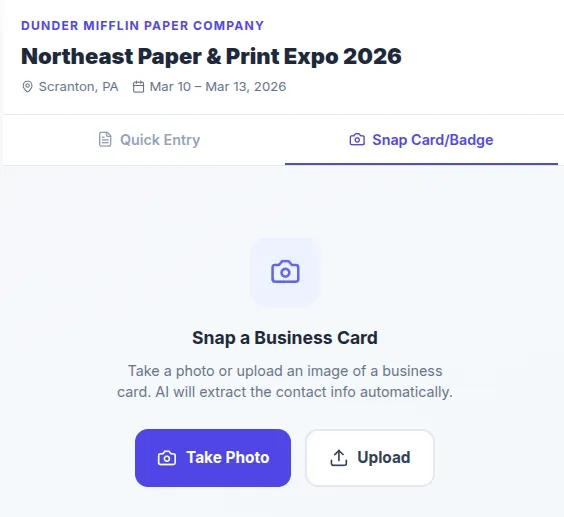
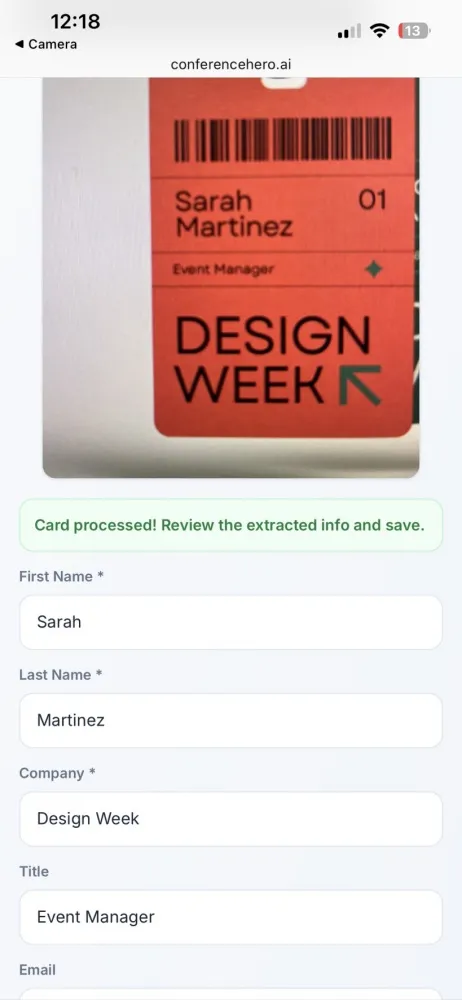
Badge Scanner → Conference Hero → HubSpot
The cleanest workflow:
Scan badge → captured in Conference Hero with timestamp
Rep adds qualifier notes in the Conference Hero mobile app (30 seconds, on the spot)
Conference Hero automatically pushes to HubSpot via API
No spreadsheet required.
What to Capture in Real Time
For every contact, log:
Field | Why it matters |
|---|---|
Lead tier (A/B/C) | Drives follow-up priority |
Pain statement | Personalizes your follow-up email |
Decision timeline | Sets sequence timing |
Stakeholders mentioned | Reveals multi-threading opportunity |
Next agreed action | Creates urgency and accountability |
If you take 2 minutes after each conversation to log these fields, your post-event follow-up will be dramatically better.
Phase 3: HubSpot Sync Setup
Option A: Conference Hero Native Integration
Conference Hero's HubSpot integration syncs contacts and deals automatically:
Connect your HubSpot portal (OAuth, no API key required)
Map Conference Hero fields to HubSpot properties
Set sync rules: create new contact / update existing / skip duplicates
Configure deal creation trigger: auto-create deal for A and B tier leads
Result: within minutes of leaving a conversation, the contact is in HubSpot with a deal in your pipeline.
Option B: HubSpot API (Custom)
For teams building a custom solution:
// POST https://api.hubapi.com/crm/v3/objects/contacts
const contact = await hubspotClient.crm.contacts.basicApi.create({
  properties: {
    email: lead.email,
    firstname: lead.firstName,
    lastname: lead.lastName,
    company: lead.company,
    jobtitle: lead.title,
    conference_source: "SaaStr 2026",
    lead_tier: lead.tier,
    meeting_notes: lead.notes,
  },
});
Then create an associated deal:
// POST https://api.hubapi.com/crm/v3/objects/deals
const deal = await hubspotClient.crm.deals.basicApi.create({
  properties: {
    dealname: `${lead.company} — SaaStr 2026`,
    pipeline: "default",
    dealstage: "appointmentscheduled",
    event_sourced: true,
    source_event_name: "SaaStr 2026",
    amount: lead.estimatedDealSize,
  },
});

// Associate deal to contact
await hubspotClient.crm.deals.associationsApi.create(
  deal.id,
  "contacts",
  contact.id,
  [{ associationCategory: "HUBSPOT_DEFINED", associationTypeId: 3 }]
);
Phase 4: Post-Conference Automation
Once leads are in HubSpot, automation takes over.
Enrollment Triggers
Set up a HubSpot workflow triggered by: Conference Source is known
Workflow: A-Tier Lead (Hot)
Immediately: Notify assigned rep via Slack
Day 1: Enroll in personalized email sequence
Day 2: Create a task - "Call [First Name] re: SaaStr conversation"
Day 7 (if no reply): Send follow-up with case study
Day 14 (if no reply): Move to B-tier sequence
Workflow: B-Tier Lead (Warm)
Day 1: Send intro email + relevant resource
Day 4: Send ROI calculator or relevant blog post
Day 9: SDR task created
Day 21: Move to long-term nurture
Slack Notifications
Use HubSpot's Slack integration to alert reps:
When an A-tier lead opens an email (deal intent signal)
When a lead visits your pricing page (purchase intent)
When a deal moves to a new stage
Phase 5: Attribution Reporting
After 30 and 90 days, run these reports in HubSpot:
Pipeline by Source Report
Report type: Deal → Funnel Filter: Source Event Name = SaaStr 2026Metrics: Deals created, total pipeline value, stage breakdown
Revenue Attribution Report
Report type: Deal → Attribution Filter: Event Sourced = trueGroup by: Event Name Metrics: Closed-won revenue, average deal size, sales cycle length
Results You Can Expect
Teams using automated conference-to-HubSpot sync typically see:
70% reduction in post-event data entry time
3x faster first follow-up (same day vs. 3+ days)
40% improvement in lead-to-meeting rate due to better context in follow-ups
Full attribution on every deal - no more guessing which conference drove revenue
Stop letting conference leads die in spreadsheets. Conference Hero syncs your leads to HubSpot automatically - with notes, scores, and deal creation built in. Sign Up Today!